
Tesmart Review
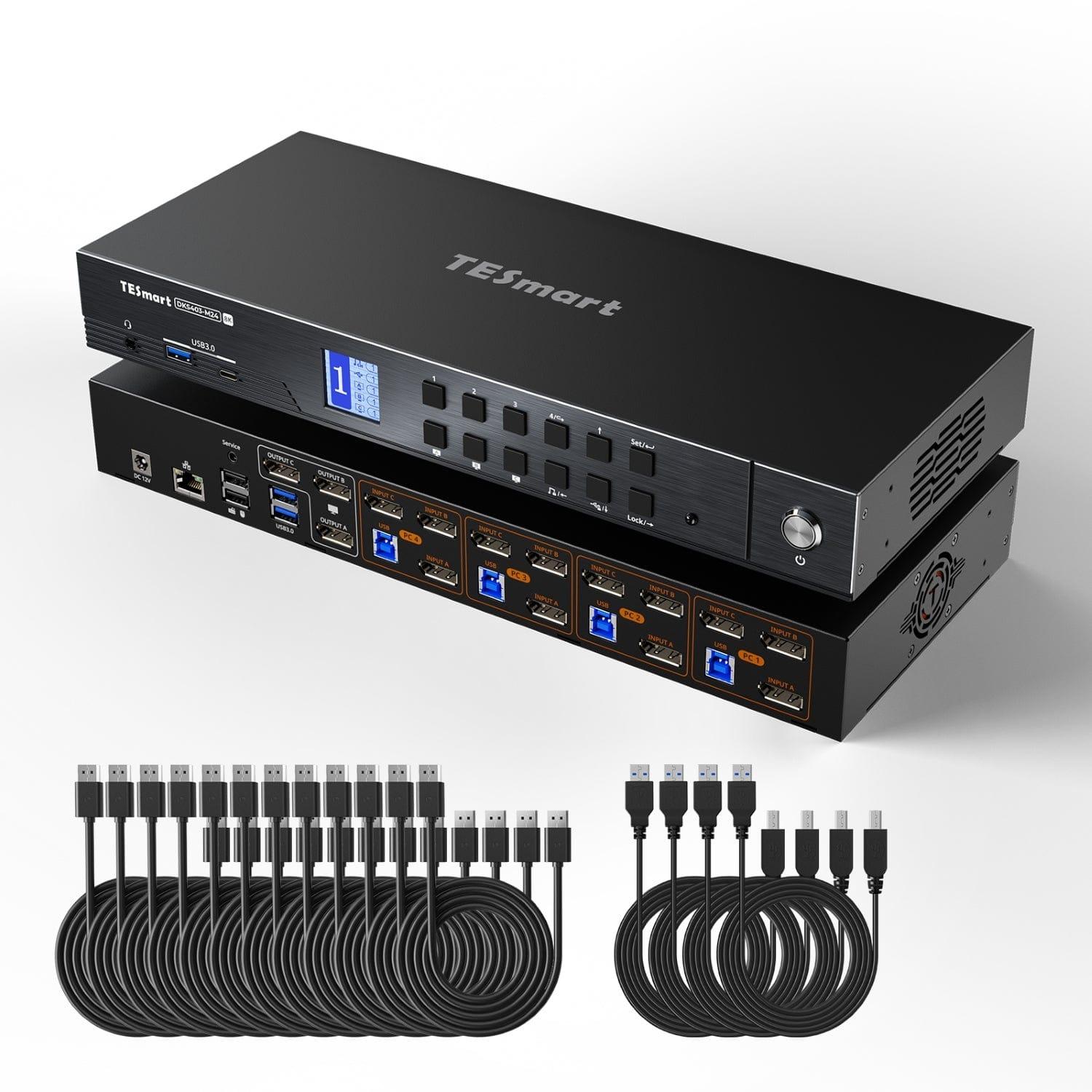
Tesmart Review: Are Tesmart KVM Switches Worth Buying?
If you use multiple computers at the same desk, switching between systems can quickly become frustrating.
A typical workstation might include a desktop PC, laptop, multiple monitors, a keyboard, mouse, webcam, speakers, and several USB devices. Switching between computers often means changing inputs, moving cables, or using several different accessories.
This is where a KVM switch can make a significant difference.
Tesmart specializes in this type of connectivity hardware. The brand offers KVM switches designed for multi-PC and multi-monitor setups, with products supporting HDMI 2.1, DisplayPort 1.4, USB-C, Thunderbolt 4, high refresh rates, and resolutions up to 8K60 depending on the model.
Tesmart specifically targets professionals, creators, developers, gamers, Mac users, and people running complex hybrid workstations.
But Tesmart products can cost considerably more than basic KVM switches.
So, is Tesmart worth buying?
For users with demanding multi-computer setups, Tesmart can be an excellent investment. For simple one-monitor switching, however, a cheaper KVM may offer better value.
[IMAGE: Tesmart DKS202-M24 KVM Switch]
What Is Tesmart?
Tesmart is a connectivity hardware brand focused primarily on KVM switching and multi-device workstation solutions.
The company's current lineup includes:
- KVM switches
- HDMI 2.1 KVM switches
- DisplayPort 1.4 KVM switches
- Thunderbolt 4 KVM solutions
- USB-C KVM docks
- HDMI switches
- KVM extenders
- Multi-monitor KVM systems
- KVM docking stations
Tesmart says its KVM technology has roots dating back to 2004 and that the company has focused on simplifying connectivity for complex computer setups. Its current product strategy is centered around high-resolution displays, high-refresh-rate gaming, Mac and Thunderbolt compatibility, and multi-monitor workflows.
What Makes Tesmart Different?
The biggest advantage of Tesmart is the range of configurations available.
Instead of simply switching one monitor between two computers, many Tesmart products are designed to control:
Multiple computers + multiple monitors + keyboard + mouse + USB peripherals
Some models also support high-end features such as:
- 8K60Hz
- 4K144Hz
- 5K120Hz
- 6K60Hz
- HDR
- VRR
- G-Sync
- FreeSync
- EDID emulation
- USB 3.0
- Gigabit Ethernet
- Thunderbolt 4
This makes Tesmart particularly interesting for users with gaming PCs, professional workstations, MacBooks, and multi-monitor desks.
Tesmart DKS202-M24 Review
[IMAGE: Tesmart DKS202-M24]
The Tesmart DKS202-M24 is one of the most compelling options in the company's current lineup.
It is designed to connect:
- 2 PCs
- 2 DisplayPort monitors
- One shared keyboard
- One shared mouse
- USB peripherals
The switch supports dual 8K60Hz output or 4K144Hz depending on the configuration and display hardware. It also supports VRR, HDR, G-Sync, FreeSync, and Smart EDID.
The current listed price is around $329.90.
Why the DKS202-M24 Is Interesting
The biggest benefit is convenience.
Imagine having:
PC 1: Gaming computer
PC 2: Work computer
Monitors: 2 × DisplayPort
Keyboard + mouse: Shared between both systems
Instead of changing cables or manually switching multiple monitor inputs, the KVM allows the workstation to be controlled from a single setup.
The Smart EDID functionality is also important because it is designed to help maintain display information when switching between computers.
That can help reduce issues such as:
- Windows moving between displays
- Resolution changes
- Monitor reconnection
- Applications changing position
For users running demanding dual-monitor setups, this can be much more convenient than a basic KVM.
Tesmart HKS202-M24 Review
[IMAGE: Tesmart HKS202-M24 HDMI 2.1 KVM]
If your setup is based around HDMI rather than DisplayPort, the Tesmart HKS202-M24 is another interesting choice.
This model is designed for:
- 2 PCs
- 2 monitors
- HDMI 2.1
- USB 3.0
- High-refresh-rate displays
- Gaming
Tesmart lists support for dual 8K60Hz or 4K144Hz, along with VRR, HDR, G-Sync, and FreeSync.
The current listed price is approximately $359.
For gaming users, HDMI 2.1 is particularly important because it provides enough bandwidth for modern high-resolution, high-refresh-rate displays.
However, you should always check your graphics card and monitor connections before buying. If your setup is primarily DisplayPort, the DKS series may make more sense.
Tesmart HDC202-X24 Thunderbolt 4 KVM
[IMAGE: Tesmart HDC202-X24]
The Tesmart HDC202-X24 is aimed at a different audience.
Instead of simply acting as a KVM, it combines KVM functionality with docking capabilities for a laptop-and-desktop setup.
The device is designed for:
- 1 laptop
- 1 desktop
- 2 monitors
- Thunderbolt 4-compatible devices
- USB peripherals
- Gigabit Ethernet
- Laptop charging
Tesmart lists support for dual 4K60Hz displays and up to 60W power delivery for the connected laptop. The current listed price is around $699.
That makes it much more expensive than the DKS202-M24.
However, for someone who regularly switches between a laptop and desktop, having KVM and docking functionality in one device can simplify the entire desk.
Tesmart for Mac Users
One of Tesmart's most interesting areas is its focus on Mac and Thunderbolt workflows.
The brand offers products designed around:
- MacBook
- Thunderbolt laptops
- Apple Studio Displays
- USB-C
- DisplayLink
- Multi-monitor Mac setups
For example, the company's current lineup includes the TKS202-X4, a dual-monitor KVM designed for Apple Studio Display environments. Tesmart lists support for dual 6K60Hz or 5K120Hz and Thunderbolt 4 connectivity.
This makes Tesmart particularly appealing to professionals who use both Mac and Windows machines.
Tesmart for Gaming
Tesmart has a strong position in the gaming KVM market.
Traditional KVM switches often focus on office environments where 1080p or 4K60Hz is sufficient.
Modern gaming setups can require much more bandwidth.
Depending on the model, Tesmart supports:
- 4K144Hz
- 8K60Hz
- VRR
- HDR
- G-Sync
- FreeSync
For example, the DKS202-M24 supports dual 8K60Hz or 4K144Hz, while the HKS202-M24 provides similar high-refresh capabilities over HDMI 2.1.
This means you can potentially share a high-refresh-rate gaming monitor between a gaming PC and another computer without giving up the benefits of modern display hardware.
However, you should make sure the KVM supports the exact resolution and refresh rate of your monitor.
If your display runs at 4K240Hz, for example, a KVM limited to 4K144Hz would become a bottleneck.

Tesmart KVM Features Explained
EDID Emulation
EDID is one of the most important technologies to understand when buying a KVM.
It helps the computer maintain awareness of the connected monitor even when switching between computers.
Poor EDID handling can result in:
- Black screens
- Resolution changes
- Windows moving
- Desktop icons changing position
- Applications behaving as though the monitor was disconnected
Tesmart includes EDID functionality across many of its newer KVM products.
High Refresh Rates
High-refresh support is another major advantage of newer Tesmart KVMs.
Depending on the product, users can get:
- 4K144Hz
- 8K60Hz
- 5K120Hz
- 6K60Hz
This is especially useful for gaming and professional workflows involving high-resolution monitors.
Multi-Monitor Support
Tesmart offers products for:
- Single-monitor setups
- Dual-monitor setups
- Triple-monitor setups
- Four-monitor setups
The company's lineup also includes models capable of handling multiple computers.
This flexibility is one of the main reasons to consider Tesmart over a basic KVM.
Tesmart Pricing
Tesmart covers a very wide price range.
| Product | Configuration | Approx. Price |
|---|---|---|
| HKS201-P23-V2 | 2 PCs / 1 monitor | $129.99 |
| HKS202-E23 | 2 PCs / 2 monitors | $199.99 |
| DKS202-M24 | 2 PCs / 2 monitors | $329.90 |
| HKS202-M24 | 2 PCs / 2 monitors | $359 |
| HDK202-M24 | 2 PCs / 2 monitors | $499.99 |
| HDC202-X24 | 1 laptop + 1 desktop / 2 monitors | $699 |
| TKS202-X4 | 2 PCs / 2 monitors | $799 |

These prices are based on Tesmart's current U.S. listings and can change because of promotions, availability, and product configuration.
The important point is that Tesmart is not a budget KVM brand across its entire lineup.
The entry-level products are reasonably accessible, while advanced multi-monitor and Thunderbolt solutions can cost several hundred dollars.
Tesmart vs. Cheap KVM Switches
Do you actually need to spend hundreds of dollars on a Tesmart KVM?
Not necessarily.
If your setup is:
2 PCs → 1 monitor → keyboard + mouse
a cheaper KVM can probably do the job.
Tesmart becomes much more compelling when your requirements look like:
2–4 PCs → 2–3 monitors → 4K144Hz/8K60Hz → gaming → USB peripherals → EDID → VRR → HDR
This is where the additional connectivity and display support can justify the higher price.
Tesmart Reliability
Reliability is one area where buyers should pay close attention.
Tesmart's current products have strong specifications and the company provides firmware updates, technical support, and setup assistance. However, KVM compatibility can vary significantly depending on the exact combination of:
- GPU
- Monitor
- Cable
- Resolution
- Refresh rate
- Operating system
- USB peripherals
This means that a KVM that works perfectly for one setup may require troubleshooting in another.
For this reason, buyers should check the compatibility information for their exact computer and monitor configuration before purchasing.
The complexity of advanced KVM systems is one of the main trade-offs compared with a simple HDMI or USB switch.
Tesmart Warranty and Support
Tesmart emphasizes long-term support for its current KVM lineup.
The company's website currently advertises 5-year warranty coverage for many newer products after registration, along with firmware updates, technical assistance, setup support, and trade-in programs.
Tesmart also provides product manuals, support resources, firmware downloads, and direct technical assistance through its website.
For a KVM that can cost several hundred dollars, this level of support is an important advantage.
Pros and Cons of Tesmart
Pros
- Excellent range of KVM switches
- Strong multi-monitor support
- 8K60Hz options
- 4K144Hz support
- HDMI 2.1 and DisplayPort 1.4 models
- Thunderbolt 4 solutions
- Mac-focused products
- Apple Studio Display compatibility
- EDID support
- VRR, HDR, G-Sync and FreeSync on supported models
- Solutions for gaming and professional workstations
- Long warranty on many newer products
- Firmware and technical support
Cons
- High-end models can be expensive
- Large product lineup can be confusing
- Advanced KVMs require careful compatibility checking
- Not every user needs the additional features
- Some setups may require troubleshooting
- Cheaper KVMs can provide better value for simple configurations

Who Should Buy Tesmart?
Tesmart is best suited to users who have a more complicated computer setup.
Tesmart is a good choice if you:
- Use two or more computers at the same desk
- Have multiple monitors
- Need 4K144Hz or 8K60Hz
- Use a gaming PC and work PC together
- Switch between Mac and Windows
- Use an Apple Studio Display
- Work with video or creative applications
- Develop software across multiple machines
- Want to reduce cable clutter
- Need EDID support
- Want one keyboard and mouse for multiple computers
You probably don't need Tesmart if you:
- Have only one computer
- Have only one monitor
- Need a basic USB switch
- Don't care about high refresh rates
- Don't use multiple USB peripherals
- Want the cheapest possible solution
Is Tesmart Good for Gaming?
Yes, especially the newer HDMI 2.1 and DisplayPort 1.4 models.
Tesmart's gaming-oriented KVMs support high refresh rates and features such as VRR, HDR, G-Sync, and FreeSync depending on the model.
The DKS202-M24 is particularly attractive for dual-monitor DisplayPort gaming setups, while the HKS202-M24 is a strong option for HDMI 2.1 configurations.
The key is matching the KVM to your graphics card and monitor.
Is Tesmart Good for Mac?
Yes.
Tesmart has expanded its product range to address MacBook, Thunderbolt, USB-C, and Apple Studio Display setups.
This is especially useful for users who switch between a Mac laptop and a Windows desktop.
Instead of connecting and disconnecting displays, keyboard, mouse, Ethernet, and other peripherals manually, a compatible Tesmart KVM can centralize the setup.
For professionals who use both macOS and Windows, this can be one of the strongest reasons to consider the brand.
Final Verdict: Is Tesmart Worth Buying?
Tesmart Rating: 4.3/5
Tesmart is a strong choice for users who need a serious KVM rather than a basic computer switch.
The biggest strength of the brand is its range.
You can find solutions for:
2 PCs + 1 monitor
as well as much more advanced configurations such as:
2 PCs + 2 monitors + 4K144Hz
or:
Laptop + desktop + dual monitors + Thunderbolt 4
The newer products offer impressive specifications, including 8K60Hz, 4K144Hz, HDMI 2.1, DisplayPort 1.4, VRR, HDR, EDID, and Thunderbolt connectivity depending on the model.
The biggest disadvantages are price and complexity.
You need to carefully match the KVM with your computers, graphics cards, monitors, cables, and desired resolution. For a basic setup, spending hundreds of dollars on a KVM simply may not make sense.
Our Recommendation
Buy Tesmart if you have a complex multi-PC, multi-monitor, gaming, or professional workstation and want to consolidate your setup.
Skip the premium models if you only need to switch a single monitor between two computers.
For the right setup, Tesmart can dramatically simplify a desk that would otherwise require multiple cables, docks, and manual input switching.
Tesmart Review FAQs
Is Tesmart a good brand?
Yes. Tesmart specializes in KVM switches and connectivity solutions for multi-computer, multi-monitor, gaming, professional, and Mac workflows.
Is Tesmart good for gaming?
Yes. Several current Tesmart KVMs support 4K144Hz, 8K60Hz, VRR, HDR, G-Sync, and FreeSync depending on the model.
Does Tesmart support 8K?
Yes. Several current models support up to 8K60Hz, while selected models also support 4K144Hz.
Does Tesmart work with Mac?
Yes. Tesmart offers products designed for MacBook, Thunderbolt, USB-C, and Apple Studio Display setups.
How long is the Tesmart warranty?
Many current Tesmart products advertise a 5-year warranty after registration. Exact warranty terms can vary by product and region.
Is Tesmart expensive?
It depends on the model. Current Tesmart products range from around $130 for simpler KVMs to $700–$800 for premium multi-monitor and Thunderbolt solutions.
Is Tesmart worth buying?
Tesmart is worth considering if you have a complex multi-PC or multi-monitor setup. For simple one-monitor switching, a cheaper KVM is likely to provide better value.